Give curtains a place to rest.
One left and one right holdback help keep curtain panels out of the way of your window AC.

A SMALL FIX FOR A FAMILIAR PROBLEM
Keep your curtains beside your air conditioner, instead of hanging in front of it. Meet AC EARS: a simple pair of holdbacks that gives your window a little breathing room.

A thoughtful little addition to your window.
CURTAINS TO THE SIDE. ROOM FOR YOUR AC.MEET YOUR CURTAINS’ NEW SIDEKICK
Window air conditioners and long curtains don’t always get along. AC EARS help them share the same space.
The curved holdbacks mount on the sides of your unit and hold the fabric back. The included steel clips bring your two curtain panels together where you want them.
See what’s includedOne left and one right holdback help keep curtain panels out of the way of your window AC.
Mount with the included double-sided adhesive strips. No screws or drilling required.
Use the three included Homestead Steel clips to hold two curtain panels together. Clip from behind for a more discreet look.
 THE LITTLE DETAIL THAT HOLDS IT TOGETHER
SIMPLE BY DESIGN
No complicated mechanism. Just an adhesive-mounted arm that holds your curtains to the side.
Check the sides of your AC before installation. Keep vents, controls, service panels, and the manufacturer’s required clearances unobstructed.
ONE KIT. THE ESSENTIALS.
Everything included in one AC EARS kit, clearly laid out. No extra package options to sort through.
One left and one right white plastic holdback.
Double-sided strips to attach the holdbacks to your unit.
Steel clips to hold two curtain panels together.
A handy guide to setting up your AC EARS.
Air conditioner and curtains are shown for illustration and are not included.
LET’S GET YOU SET UP
Read the instruction card included with your kit before you begin. These steps are a quick overview.
Wipe dusty mounting areas with a damp cloth and let them dry. Check the intended position on each side of the unit before peeling the adhesive backing.
Apply the supplied adhesive strips to the holdbacks. Remove the backing and mount the left and right pieces on the sides of your AC, following the included card.
Rest the curtain panels behind the arms. Use the included clips to join the panels where needed, attaching from behind for a discreet finish.
A quick check before you finish. Make sure fabric and holdbacks do not cover any air inlet, outlet, control, or service area. Follow your AC manufacturer’s placement and clearance instructions.
SEE THE IDEA IN ACTION
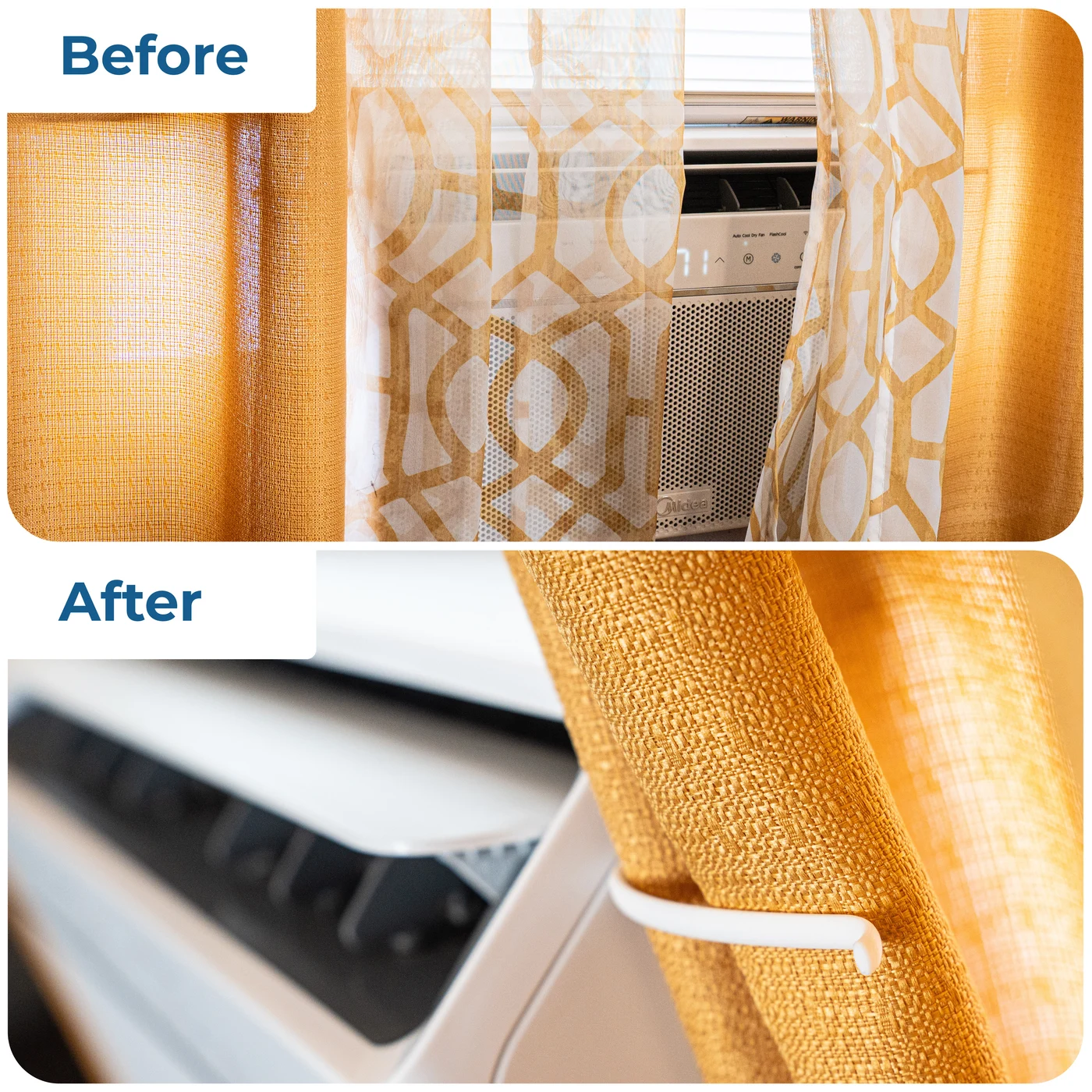
Move the fabric to the side and let the AC have its own space. These real product photos show how AC EARS change the position of your curtains.
Images demonstrate curtain placement, not measured cooling performance. Light blocking depends on your curtains and installation.

A LITTLE HELP FOR YOUR WINDOW
One holdback pair, adhesive strips, three steel clips, and an instruction card. Your simple curtain-side solution.
Our direct product link will be added here. Have a question in the meantime? Say hello.
You’ll continue to Amazon to see current pricing, availability, and order details.
GOOD QUESTIONS. STRAIGHT ANSWERS.
Getting to know AC EARS or need a hand with your setup? Start here.
AC EARS are curtain holdbacks for window air conditioners. They mount to the sides of the unit to help keep curtain fabric from hanging in front of it. The included Homestead Steel clips can hold two curtain panels together.
One left and one right AC EARS holdback, double-sided adhesive strips, three Homestead Steel curtain clips, and one instruction card. The holdbacks are plastic and the clips are steel. Curtains and the air conditioner are not included.
Fit depends on the shape of your unit, the available mounting space, and the position of your curtains. We do not claim universal compatibility. Keep vents, controls, and service panels clear and follow your AC manufacturer’s clearance instructions.
Not sure about your setup? Email us with your AC make and model and a photo of the mounting area before installing.
No drilling or screws are needed. AC EARS mount with the included double-sided adhesive strips. Clean and dry the mounting areas first, then follow the instruction card supplied with your kit.
Use the clips to join your two curtain panels where you want them to stay together. Start near the top and work downward as needed. Attach from the back for a more discreet look, and keep the curtain fabric clear of the AC’s vents and controls.
AC EARS hold curtains to the sides of your unit, while the clips hold panels together. How much light is blocked depends on your curtains and installation. We do not claim a specific temperature change, faster cooling, complete darkness, or energy savings.
Take the curtain load off the holdback and stop using it if it feels loose. Check that the mounting area is clean and completely dry, the adhesive backing has been removed, and the mounting base can sit fully against the surface. Refer to the supplied instructions before remounting.
If the problem continues, contact us with a photo of the holdback, adhesive, and mounting surface. Avoid adding unapproved glue or screws to your air conditioner.
Check that each panel is resting behind its holdback and that excess fabric is not draping over the arm. Adjust the curtain arrangement without pulling hard on the adhesive mount. If you cannot keep the vents and controls clear, stop using that arrangement and contact us with a photo so we can help assess the fit.
Adhesive behavior and removal depend on the surface and the strip used. We do not promise damage-free or residue-free removal. Do not force a mounted piece off the unit. Contact us for guidance before removal or repositioning, and follow your air conditioner’s surface-care instructions.
Please email hello@acears.com with a description and, if helpful, a photo. Have your order information ready. For Amazon delivery, return, and refund options, check the order in your Amazon account.
No matching questions. Try a different word or get in touch.
WE’RE ALL EARS
Ask about fit, installation, or your AC EARS kit. A clear photo of your setup can help us understand what you’re working with.
hello@acears.comEmail opens in your email app. For delivery tracking or Amazon return options, visit the order in your Amazon account.